
Introduction
This tutorial demonstrates how to build an AI agent with persistent long-term memory using LangGraph and FAISS vector database. Unlike typical chatbots that forget everything after each session, this agent remembers important details across conversations, creating truly personalized interactions.
We'll build a terminal-based AI assistant that stores user information in a vector database and retrieves relevant memories contextually during conversations. The implementation uses LangGraph for workflow orchestration, Google's Gemini model for language understanding, and FAISS for efficient similarity search.
What You'll Learn: How to implement persistent memory using vector databases, create intelligent memory management tools, orchestrate complex AI workflows with LangGraph, and build agents that truly understand context across sessions.
Why Long-Term Memory?
Traditional LLM-based agents are fundamentally stateless. Each conversation starts from scratch, with no awareness of previous interactions. This creates a frustrating user experience—imagine having to re-introduce yourself every time you talk to someone.
By implementing long-term memory, we enable agents to:
Remember User Context
Store and recall personal details, preferences, and conversation history
Build Understanding Over Time
Accumulate knowledge about users across multiple sessions
Provide Contextual Responses
Reference past conversations naturally in current interactions
Create Personalized Experiences
Adapt responses based on accumulated user knowledge
Vector databases make this possible by storing memories as embeddings and retrieving them through semantic similarity search. When you tell the agent your name today, it will remember it tomorrow—and every day after.
Project Setup
First, install the required dependencies. This project uses LangChain for LLM integration, LangGraph for workflow orchestration, FAISS for vector storage, and Google's Gemini models for language understanding.
pip install langchain langgraph langchain-community langchain-google-genai faiss-cpu python-dotenvYou'll need an API key from Google AI Studio. It's free to sign up and provides access to Gemini models with generous rate limits.
Create a .env file in your project root:
GOOGLE_API_KEY=your_google_api_keyRequired Imports
Here are all the imports you'll need. These cover environment setup, embeddings, LangGraph components, and memory management:
import os
import uuid
from typing import List
from dotenv import load_dotenv

from langchain_google_genai import (
    ChatGoogleGenerativeAI,
    GoogleGenerativeAIEmbeddings
)
from langchain_community.vectorstores import FAISS
from langchain_core.documents import Document
from langchain_core.messages import get_buffer_string
from langchain_core.prompts import ChatPromptTemplate
from langchain_core.runnables import RunnableConfig
from langchain_core.tools import tool
from langgraph.checkpoint.memory import MemorySaver
from langgraph.graph import END, START, MessagesState, StateGraph
from langgraph.prebuilt import ToolNode

load_dotenv()
GOOGLE_API_KEY = os.getenv("GOOGLE_API_KEY")
1. Initializing the LLM and Embeddings
We use Google's Gemini 2.0 Flash model for language understanding and their embedding model for converting text into vector representations. The LLM handles conversations while embeddings enable semantic similarity search.
llm = ChatGoogleGenerativeAI(model="gemini-2.0-flash")
 embeddings = GoogleGenerativeAIEmbeddings(
    model="models/gemini-embedding-exp-03-07"
)
These components work together: the LLM generates intelligent responses while the embedding model converts memories into vectors that can be efficiently searched and retrieved based on semantic meaning rather than keyword matching.
2. Setting Up FAISS for Persistent Memory
FAISS (Facebook AI Similarity Search) provides efficient similarity search for high-dimensional vectors. We use it to store memory embeddings locally on disk, ensuring memories persist across sessions.
FAISS_INDEX_PATH = "faiss_index"

# Load existing index or create new one
if os.path.exists(FAISS_INDEX_PATH):
    vector_store = FAISS.load_local(
        FAISS_INDEX_PATH,
        embeddings,
        allow_dangerous_deserialization=True
    )
else:
    # Initialize with dummy document to avoid empty index
    vector_store = FAISS.from_texts(["init"], embeddings)
Technical Note
FAISS requires at least one document to create an index initially. We use a dummy "init" document which gets overwritten when real memories are saved. This ensures the index structure is properly initialized even on first run.
3. Creating Memory Management Tools
We define two tools that the agent can use to manage memories. The @tool decorator from LangChain automatically makes these functions available to the LLM as callable actions.
@tool
def save_recall_memory(memory: str, config: RunnableConfig) -> str:
    """
    Save a memory string to the vector store for future retrieval.

    Args:
        memory: The information to remember
        config: Runtime configuration including user_id

    Returns:
        The saved memory string
    """
    user_id = config["configurable"].get("user_id")
    doc = Document(
        page_content=memory,
        metadata={"user_id": user_id}
    )
    vector_store.add_documents([doc])
    vector_store.save_local(FAISS_INDEX_PATH)
    return memory

@tool
def search_recall_memories(
    query: str,
    config: RunnableConfig
) -> List[str]:
    """
    Search for relevant memories using semantic similarity.

    Args:
        query: Current conversation context
        config: Runtime configuration including user_id

    Returns:
        List of relevant memory strings
    """
    user_id = config["configurable"].get("user_id")
    results = vector_store.similarity_search(query, k=10)

    # Filter by user_id and return top 3
    filtered = [
        doc.page_content
        for doc in results
        if doc.metadata.get("user_id") == user_id
    ]
    return filtered[:3]
The save_recall_memory tool stores important information in the vector database, while search_recall_memories retrieves relevant memories based on semantic similarity to the current conversation. Each memory is tagged with a user_id to ensure privacy and proper scoping.
How Does the Agent Decide What to Remember?
The LLM itself decides what's important to remember based on the prompt instructions and conversation context. When the prompt tells the model it has memory-saving capabilities, it autonomously chooses when to invoke these tools—typically saving user preferences, personal details, and contextually significant information.
4. Crafting the Agent Prompt
The prompt is crucial—it instructs the agent how to use memory effectively. A shallow prompt will result in poor memory usage. This comprehensive prompt (adapted from LangChain's documentation) provides detailed guidelines for memory management.
prompt = ChatPromptTemplate.from_messages([
    ("system", """
You are a helpful assistant with advanced long-term memory capabilities.
Powered by a stateless LLM, you must rely on external memory to store
information between conversations. Utilize the available memory tools
to store and retrieve important details.

Memory Usage Guidelines:
1. Actively use memory tools to build comprehensive user understanding
2. Make informed suppositions based on stored memories
3. Regularly reflect on past interactions to identify patterns
4. Update your mental model of the user with each new piece of info
5. Cross-reference new information with existing memories
6. Prioritize storing emotional context and personal values
7. Use memory to anticipate needs and tailor responses
8. Recognize changes in user's situation over time
9. Leverage memories to provide personalized examples
10. Recall past challenges or successes for problem-solving

## Recall Memories
Contextually retrieved based on current conversation:
{recall_memories}

## Instructions
Engage naturally as a trusted colleague or friend. Seamlessly
incorporate your understanding without explicitly mentioning memory
capabilities. Be attentive to subtle cues and emotions. Use tools
to persist information you want to retain. If you call tools, all
text preceding the tool call is internal. Respond AFTER calling
the tool, once you have confirmation it completed successfully.
"""),
    ("placeholder", "{messages}"),
])
This prompt establishes the agent's behavior: actively using memory tools, making informed connections between past and present conversations, and engaging naturally without explicitly announcing its memory capabilities. The quality of this prompt directly impacts how intelligently the agent manages memory.
5. Assembling the LangGraph Workflow
LangGraph orchestrates the agent's workflow by defining states and transitions. We create a custom state that includes memory alongside the standard message history.
Define State and Nodes
# Define custom state with memory
class State(MessagesState):
    recall_memories: List[str]

# Node 1: Load relevant memories
def load_memories(state: State, config: RunnableConfig) -> State:
    convo = get_buffer_string(state["messages"])
    convo = convo[:2048]  # Truncate to reasonable length
    recall = search_recall_memories.invoke(convo, config)
    return {"recall_memories": recall}

# Node 2: Agent reasoning
def agent(state: State) -> State:
    recall_str = (
        "<recall_memory>\n"
        + "\n".join(state["recall_memories"])
        + "\n</recall_memory>"
    )
    response = (prompt | llm_with_tools).invoke({
        "messages": state["messages"],
        "recall_memories": recall_str,
    })
    return {"messages": [response]}
Build the Graph
# Bind tools to LLM
tools = [save_recall_memory, search_recall_memories]
llm_with_tools = llm.bind_tools(tools)

# Build state graph
builder = StateGraph(State)
builder.add_node(load_memories)
builder.add_node(agent)
builder.add_node("tools", ToolNode(tools))

# Define edges
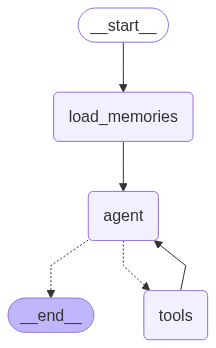
builder.add_edge(START, "load_memories")
builder.add_edge("load_memories", "agent")
builder.add_conditional_edges(
    "agent",
    lambda s: "tools" if s["messages"][-1].tool_calls else END,
    ["tools", END]
)
builder.add_edge("tools", "agent")

# Compile with checkpointer
graph = builder.compile(checkpointer=MemorySaver())
The workflow proceeds as follows: load relevant memories → agent processes with context → if tools are called, execute them → loop back to agent → end when no more tools needed. This creates a dynamic conversation flow where the agent can retrieve and save memories as needed.
6. Building the Terminal Interface
Finally, we create a simple terminal-based chat interface that allows users to interact with the agent. The interface handles user input, maintains conversation history, and displays agent responses.
def terminal_chat():
    # Get or generate user_id
    user_id = input("Enter your user_id: ") or "1"
    config = {
        "configurable": {
            "user_id": user_id,
            "thread_id": str(uuid.uuid4())
        }
    }

    history = []
    print("\nYou can start chatting. Type 'exit' to quit.\n")

    while True:
        user_input = input("You: ")
        if user_input.lower() in ["exit", "quit"]:
            break

        # Add user message to history
        history.append(("user", user_input))

        # Stream agent response
        for chunk in graph.stream(
            {"messages": history},
            config=config
        ):
            if "agent" in chunk and "messages" in chunk["agent"]:
                last_msg = chunk["agent"]["messages"][-1]
                if last_msg.content:
                    print("AI:", last_msg.content)
                    history.append(("ai", last_msg.content))

if __name__ == "__main__":
    terminal_chat()
Each conversation maintains its own thread ID while user memories persist across all threads for that user. This means you can have multiple separate conversations, but the agent remembers who you are in all of them.
Conclusion
We've successfully built a terminal-based AI assistant with persistent long-term memory—a significant step toward truly personalized AI experiences. Unlike typical chatbots that forget everything after each session, this agent recalls meaningful details, adapts over time, and builds a deeper understanding with each conversation.
This implementation demonstrates the power of combining LangGraph's workflow orchestration with vector database storage. The agent autonomously decides what to remember, retrieves relevant context when needed, and maintains natural conversations informed by past interactions.
Potential Enhancements
This chatbot can be further enhanced in multiple ways:
Memory Scoping
Implement per-project or per-topic memory organization for better context management
Web Interface
Build a modern web UI using the same memory architecture with FastAPI or Flask
Interaction Logging
Add comprehensive logging for debugging and analyzing agent behavior
Memory Analytics
Build tools to visualize and analyze stored memories over time
Key Takeaway
This tutorial demonstrates how combining LangGraph + LangChain + FAISS creates powerful agentic memory systems that persist across sessions. The techniques shown here form the foundation for building truly intelligent AI assistants that grow smarter with every interaction.